


USB drives have become an easy way to carry important files wherever we go. Whether it’s financial documents for a client meeting, work files transferred between devices, family records, or personal documents needed while traveling, portable storage makes accessing information quick and convenient.
But that convenience comes with a risk: USB drives can be lost, stolen, or connected to computers that may not be secure.
If a drive contains sensitive information, simply having a password on the device may not be enough. Encryption adds another layer of protection by making stored data unreadable to anyone who does not have the proper authentication.
With portable data becoming a bigger part of everyday work and personal life, Kingston Technology is highlighting what users should look for when choosing an encrypted drive—and how to match the right level of protection to their needs.
What to Look for in an Encrypted Drive
Not all drives marketed as “encrypted” provide the same level of protection. Kingston recommends considering four key factors when choosing secure portable storage.
1. Choose a Trusted Manufacturer
Data security starts with choosing a manufacturer with proven experience in secure storage.
Rather than basing a purchase solely on price or storage capacity, users should look for companies with a strong track record in data protection. Products that have undergone rigorous testing, including independent penetration testing where applicable, can also provide greater confidence in their security claims.
2. Look for Always-On, Hardware-Based Encryption
One of the biggest differences between secure drives is how encryption is handled.
Software-based encryption relies on the computer’s operating system and software, which can potentially expose data to malware and other software-based attacks. Hardware-encrypted drives, on the other hand, use a dedicated secure microprocessor built into the device.
With hardware-based encryption, files are automatically encrypted when they are saved and can only be decrypted after proper authentication.
Kingston’s IronKey drives use industry-standard XTS-AES 256-bit hardware encryption, with encryption keys protected within the device. Always-on encryption also helps ensure that users cannot simply disable or bypass the protection.
3. Check for Security Certifications and Standards
For organizations handling highly sensitive information, security claims should ideally be backed by recognized certifications and standards.
One example is NIST FIPS 140-3, a U.S. government standard for cryptographic modules that involves rigorous independent testing. Another is TAA compliance, which is particularly important for U.S. federal and defense procurement because it addresses supply-chain requirements.
These certifications and standards can provide additional assurance that a product’s security features have undergone defined evaluation and testing—something that can be especially important for government agencies, regulated industries, and businesses handling confidential information.
4. Consider Additional Security Features
Encryption is important, but it is only one part of protecting portable data.
Users should also consider features designed to defend against common attacks and unauthorized access. These can include:
- Brute-force protection, which can erase data after repeated failed password attempts.
- BadUSB protection, which helps guard against malicious firmware tampering.
- Multiple password options, such as separate Administrator and User access or recovery passwords.
- Read-only modes, which can prevent files from being modified when the drive is connected to an untrusted computer.
The right combination of features will depend on how sensitive the information is and where the drive will be used.
Which Kingston IronKey Drive Is Right for You?
There is no single encrypted drive that fits everyone. A student carrying schoolwork has very different requirements from a healthcare organization transferring sensitive information or a company maintaining an offline disaster recovery backup.
With more than two decades of experience in hardware-encrypted storage, Kingston offers its Kingston IronKey portfolio for different users and security requirements.
For Students, Families, and Everyday Users
For people who simply want to keep personal documents, tax records, schoolwork, and other private files secure, ease of use is just as important as protection.
The Kingston IronKey Locker+ 50 G2 USB Flash Drive offers XTS-AES 256-bit hardware encryption and a multi-password option. Its onboard software allows users to set it up without installing additional software on their computer.
This makes it a practical option for moving between home, school, and work computers while keeping personal files protected if the drive is lost, stolen, or connected to a shared computer.
For Freelancers and Remote Workers
Freelancers and remote workers often deal with sensitive client documents, contracts, financial records, and other important files across multiple devices.
The Kingston IronKey Vault Privacy 50 Series combines XTS-AES 256-bit hardware encryption with Administrator, User, and One-Time Recovery password options. These features provide added flexibility while helping users maintain access to their data if a User password is forgotten.
For Professionals Using Specialized Equipment
Some professionals need to transfer important data between specialized systems, including medical, industrial, and security equipment.
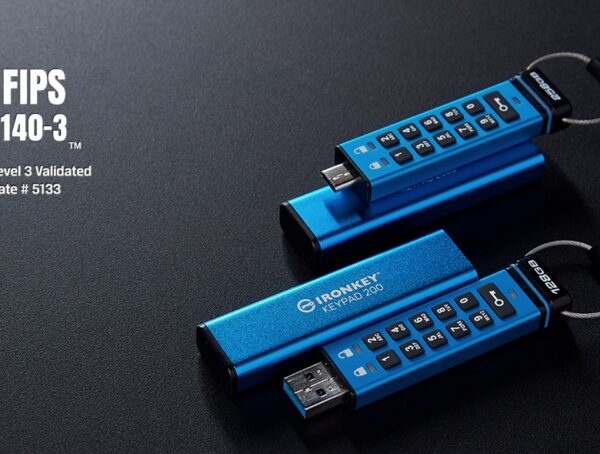
The Kingston IronKey Keypad 200 Series is FIPS 140-3 Level 3 validated and uses an alphanumeric keypad for PIN-based access. Because authentication happens directly on the drive, users can unlock it without relying on software before connecting it to a compatible USB-enabled system.
Its tamper-resistant design also helps protect the data if the drive is lost or stolen.
For Small and Medium-Sized Businesses
Businesses handle large amounts of valuable information every day, including employee records, customer databases, financial files, and offline disaster recovery backups.
The Kingston IronKey Vault Privacy 80 External SSD combines hardware-based encryption with a touchscreen interface designed to feel familiar to smartphone users. Available in capacities of up to 8TB, it provides businesses and IT managers with a convenient way to secure large amounts of data.
The drive has also received recognition from the ASTORS Homeland Security Awards, where it was named a triple Platinum winner.
For Regulated Industries and Organizations
Organizations in industries such as finance, healthcare, legal services, and government often have to meet strict data privacy, security, and procurement requirements.
The Kingston IronKey D500S USB Flash Drive is FIPS 140-3 Level 3 validated, uses XTS-AES 256-bit hardware encryption, and is TAA-compliant. It is also built to MIL-STD-810F military standards.
Its rugged zinc casing, epoxy-filled construction, and automated crypto-erase features are designed to provide additional protection against both physical and digital threats.
Portable Data Needs Portable Protection
The ability to carry important data in your pocket is incredibly convenient, but it also means that sensitive information can easily leave the security of a home or office.
For that reason, portable storage should be considered part of a broader data security strategy.
“Portable storage makes it easy to move important information wherever it is needed, but that convenience should not come at the expense of security,” said Kingston. “Kingston’s long-standing commitment to data protection is built on helping users make informed security decisions. This begins with understanding the value and sensitivity of their data, then matching those needs with the right level of hardware-based security, usability, and compliance.”
From everyday personal files to business-critical information, Kingston IronKey offers several options designed to address different levels of security and usability.
Backed by certifications and standards including NIST FIPS 140-3 Level 3 validation, TAA compliance, and FIPS 197 certification, as well as industry recognition, the IronKey portfolio provides users with additional tools to keep sensitive data protected wherever it goes.
For more information, visit Kingston.com/ironkey.
About Kingston Technology
From big data and IoT devices to laptops, PCs, and wearable technology, Kingston Technology develops memory and storage solutions designed to meet the needs of consumers and businesses.
Trusted by leading PC manufacturers and global cloud providers, Kingston focuses on product quality, customer support, and long-term partnerships as it continues to develop new technology solutions.
To learn more, visit Kingston.com.
You might also like

More from Lifestyle

Fuel-Saving Tips for Your Holy Week Road Trip from Ford Philippines
MANILA, Philippines, April 1, 2026 — Long weekends—especially during Holy Week—are a cherished time for Filipinos to step away from …
TCL Celebrates 26 Years with Big TV Deals and Next-Level Home Entertainment!
For 26 years, TCL Electronics has been a trusted name in Filipino homes, known for delivering world-class innovation and comfort. …

Today’s Best NBA Dribblers: Masters of the Handle
In basketball, elite dribbling often captivates fans even more than a perfectly executed shot. It’s the artistry, creativity, and unpredictability …